> ## Documentation Index
> Fetch the complete documentation index at: https://docs.wallchain.xyz/llms.txt
> Use this file to discover all available pages before exploring further.
# Select Campaigns: Getting Started For Creators
### **Step 1**
To participate in Select Campaigns, head to [app.wallchain.xyz](http://app.wallchain.xyz) and sign in via X. In the left sidebar, click Select Campaigns.
### **Step 2**
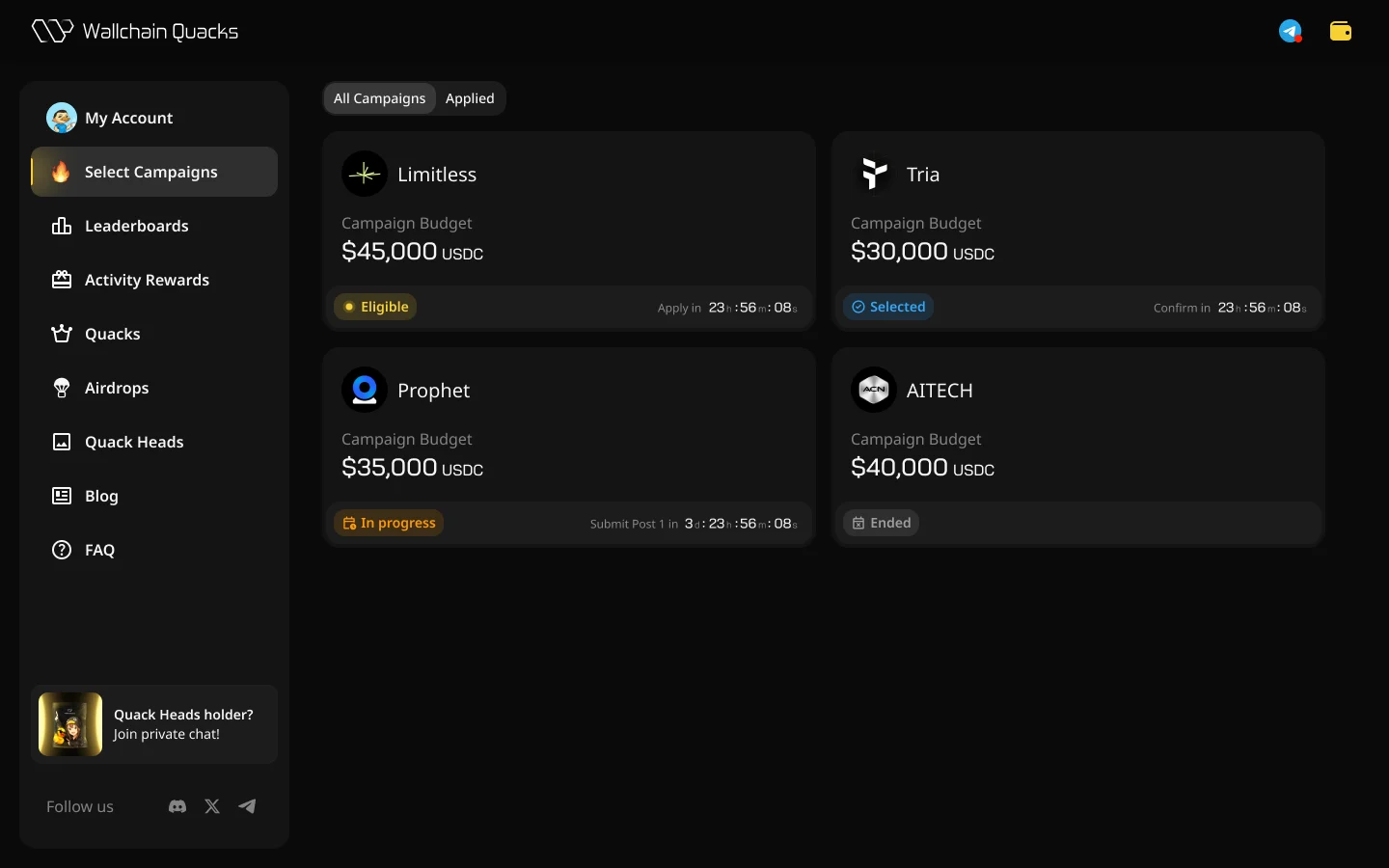
The Select page lists all currently live campaigns. Two tabs at the top:
* **All Campaigns** – everything currently running
* **Applied** – only the campaigns you've applied to
Each card shows the project logo and name, the total reward pool, your current status in that campaign, and a timer indicating the next deadline (Apply in, Confirm in, Submit Post in, or Ended).
 ### **Step 3**
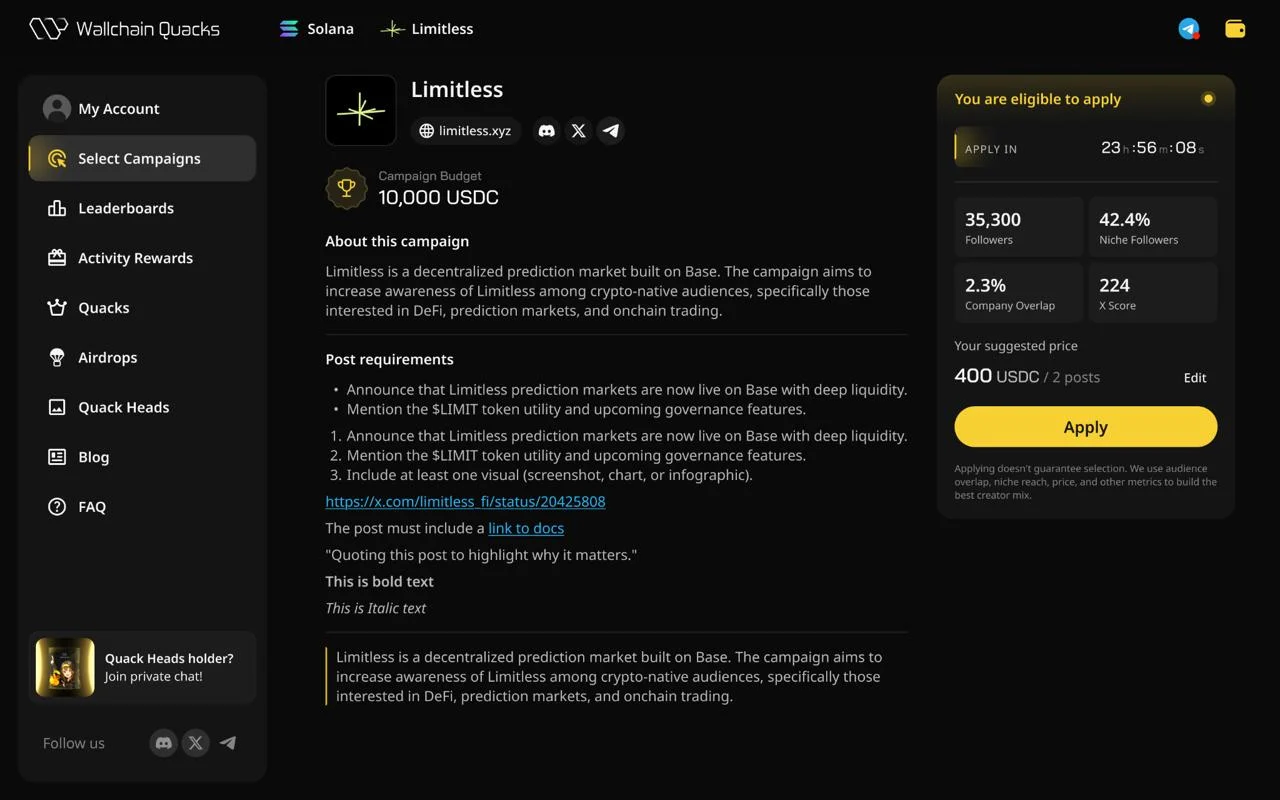
Clicking a campaign card opens the campaign's detail page:
**Campaign requirements (left side)**
* Project name, domain, and social links
* Reward pool – total budget across all selected creators
* About this campaign – what the project does and why they're running this
* General posting requirements – exact rules: what to mention, hashtags, links, format, screenshots required, and so on
* A link to the brief post or external documentation (if specified)
**Your eligibility (right side)**
* **Apply in** – countdown to the application deadline
* **Followers** – your follower count
* **Niche Followers (%)** – share of your followers who are also in this project's niche. Read [this report](https://news.wallchain.xyz/p/more-reach-for-half-the-cost) to learn more.
* **Company Overlap (%)** – share of your followers who already follow the project.
* **X Score** – Wallchain's audience-quality metric.
* **Your suggested price** – recommendation for this specific campaign, with the number of posts.
You also see if you’re eligible to apply to this specific campaign (meet the project’s requirement based on X Score, niche followers, etc.).
### **Step 3**
Clicking a campaign card opens the campaign's detail page:
**Campaign requirements (left side)**
* Project name, domain, and social links
* Reward pool – total budget across all selected creators
* About this campaign – what the project does and why they're running this
* General posting requirements – exact rules: what to mention, hashtags, links, format, screenshots required, and so on
* A link to the brief post or external documentation (if specified)
**Your eligibility (right side)**
* **Apply in** – countdown to the application deadline
* **Followers** – your follower count
* **Niche Followers (%)** – share of your followers who are also in this project's niche. Read [this report](https://news.wallchain.xyz/p/more-reach-for-half-the-cost) to learn more.
* **Company Overlap (%)** – share of your followers who already follow the project.
* **X Score** – Wallchain's audience-quality metric.
* **Your suggested price** – recommendation for this specific campaign, with the number of posts.
You also see if you’re eligible to apply to this specific campaign (meet the project’s requirement based on X Score, niche followers, etc.).
 ### **Step 4**
When applying to a campaign, you have two options:
* **Accept the suggested price.** Click Apply. Done.
* **Set your own price.** Click Edit, type a new number, Save, then Apply.
### **Step 4**
When applying to a campaign, you have two options:
* **Accept the suggested price.** Click Apply. Done.
* **Set your own price.** Click Edit, type a new number, Save, then Apply.
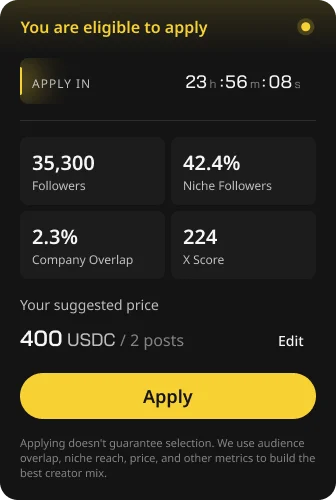 **Applying doesn't guarantee selection**. The project picks creators based on a mix of audience overlap, niche reach, price, and other metrics. There's no auto-accept.
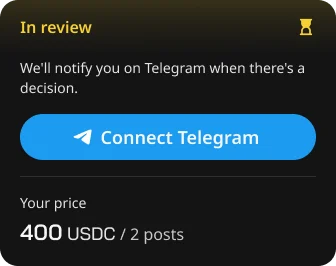
After you apply, the panel switches to In review with a prompt to Connect Telegram.
Connecting to the Telegram bot is worth doing to stay on top of your campaign status – when you're selected for a campaign, you'll have a confirmation window to accept your spot. The Telegram bot is also where you'll get general notifications about new campaigns, post reviews, and other updates.
**Applying doesn't guarantee selection**. The project picks creators based on a mix of audience overlap, niche reach, price, and other metrics. There's no auto-accept.
After you apply, the panel switches to In review with a prompt to Connect Telegram.
Connecting to the Telegram bot is worth doing to stay on top of your campaign status – when you're selected for a campaign, you'll have a confirmation window to accept your spot. The Telegram bot is also where you'll get general notifications about new campaigns, post reviews, and other updates.
 ## **Step 5**
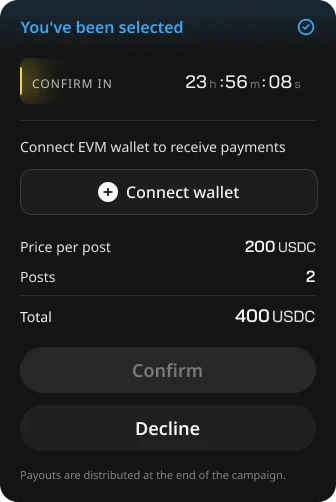
If you're selected, the status changes to "You've been selected" and a confirmation timer appears.
**To accept the campaign:**
* Click Connect wallet and connect an EVM wallet. This is where payment will be sent. You can later change your wallet in Settings, but always make sure you connect a wallet you actually control and intend to use long-term.
* Review the summary: price per post, number of posts, total.
* Click Confirm.
**To decline:**
* Click Decline.
## **Step 5**
If you're selected, the status changes to "You've been selected" and a confirmation timer appears.
**To accept the campaign:**
* Click Connect wallet and connect an EVM wallet. This is where payment will be sent. You can later change your wallet in Settings, but always make sure you connect a wallet you actually control and intend to use long-term.
* Review the summary: price per post, number of posts, total.
* Click Confirm.
**To decline:**
* Click Decline.
 **Possible outcomes at this stage**
Confirm – status moves to In progress.
Decline – Campaign declined. Your spot is passed to another creator.
No action before the timer ends – Selection expired. Same outcome as declining.
Not selected – means a project selected other creators. Your profile stays active for future campaigns; no action needed.
### **Step 6**
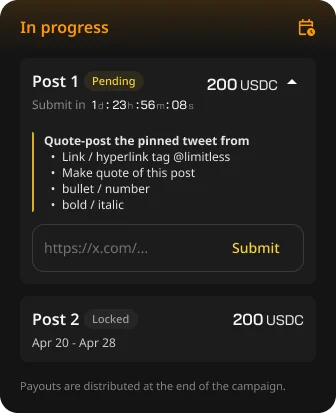
After confirmation, the campaign page shows all the posts in the campaign as a sequence: Post 1, Post 2, and so on.
For a live post, you see:
* **Status** – Pending, In review, Approved, Rejected, Declined, Time Over, or Locked
* **Price** in USDC
* **Publish window** – date range or specific timestamp
* An expandable brief with the exact requirements for that post
**Submission steps**
* Publish the post on X (or whichever platform the campaign uses)
* Make sure the post includes everything the brief asks for – mentions, links, hashtags, screenshots, the native Paid Partnership label, etc.
* Copy the post link
* Paste it into the "[https://x.com/](https://x.com/)..." field on the platform
* Click Submit
**Possible outcomes at this stage**
Confirm – status moves to In progress.
Decline – Campaign declined. Your spot is passed to another creator.
No action before the timer ends – Selection expired. Same outcome as declining.
Not selected – means a project selected other creators. Your profile stays active for future campaigns; no action needed.
### **Step 6**
After confirmation, the campaign page shows all the posts in the campaign as a sequence: Post 1, Post 2, and so on.
For a live post, you see:
* **Status** – Pending, In review, Approved, Rejected, Declined, Time Over, or Locked
* **Price** in USDC
* **Publish window** – date range or specific timestamp
* An expandable brief with the exact requirements for that post
**Submission steps**
* Publish the post on X (or whichever platform the campaign uses)
* Make sure the post includes everything the brief asks for – mentions, links, hashtags, screenshots, the native Paid Partnership label, etc.
* Copy the post link
* Paste it into the "[https://x.com/](https://x.com/)..." field on the platform
* Click Submit
 ### **Step 7**
Submitted posts go through review. Four possible outcomes:
1. **Approved.** The post meets the brief. Payment for this post is guaranteed.
2. **Rejected.** Something specific is wrong but fixable – for example, "Please mention @brand". You'll see the exact reason, a link to the View post, and a Re-Submit field. Edit the original post (or publish a new one), paste the new link, and Re-Submit.
3. **Declined.** The post doesn't meet the requirements and won't be paid. No re-submission. Why can it happen? The submission date is missed, and your rejected post wasn’t resubmitted at the time. Or due to individual reasons.
4. **Time Over.** The publishing window closed before you submitted.
### **Step 8**
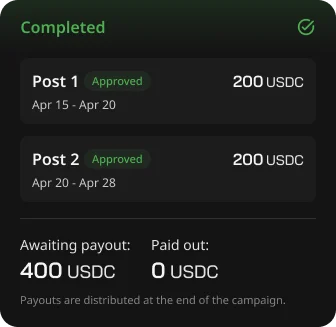
Once all posts have been processed or the campaign window closes, the campaign status becomes Completed.
The summary shows two amounts:
* **Awaiting payout** – total approved but not yet paid
* **Paid out** – total already sent to your wallet
Payouts go to the wallet you connected at confirmation. Processing happens after the full campaign ends.
### **Step 7**
Submitted posts go through review. Four possible outcomes:
1. **Approved.** The post meets the brief. Payment for this post is guaranteed.
2. **Rejected.** Something specific is wrong but fixable – for example, "Please mention @brand". You'll see the exact reason, a link to the View post, and a Re-Submit field. Edit the original post (or publish a new one), paste the new link, and Re-Submit.
3. **Declined.** The post doesn't meet the requirements and won't be paid. No re-submission. Why can it happen? The submission date is missed, and your rejected post wasn’t resubmitted at the time. Or due to individual reasons.
4. **Time Over.** The publishing window closed before you submitted.
### **Step 8**
Once all posts have been processed or the campaign window closes, the campaign status becomes Completed.
The summary shows two amounts:
* **Awaiting payout** – total approved but not yet paid
* **Paid out** – total already sent to your wallet
Payouts go to the wallet you connected at confirmation. Processing happens after the full campaign ends.
 \*\*\*
Wallchain operates as infrastructure between projects and creators. You participate as an independent contractor – taxes, regulatory filings, and local compliance are on you.
Make sure you read and understand [Terms & Conditions](https://docs.wallchain.xyz/terms-of-service) before participating in any specific campaign.
\*\*\*
Wallchain operates as infrastructure between projects and creators. You participate as an independent contractor – taxes, regulatory filings, and local compliance are on you.
Make sure you read and understand [Terms & Conditions](https://docs.wallchain.xyz/terms-of-service) before participating in any specific campaign.